 PicSwipe
Most people searching for a SwipeWipe alternative want one of two things: to stop paying for a photo cleaner, or to check that the app they installed is trustworthy before they keep going. This guide answers both plainly — how to cancel the subscription through Apple, what SwipeWipe actually costs, what to look for in a replacement, and where PicSwipe fits. We'll stick to facts that are verifiable from the App Store listing and SwipeWipe's own FAQ.
How to cancel your SwipeWipe subscription
Subscriptions bought through an iPhone app are managed by Apple, not by the app's developer — so you cancel in iOS Settings, not inside SwipeWipe:
- Open Settings and tap your name at the very top.
- Tap Subscriptions.
- Find and tap the SwipeWipe (listed as "Photo Cleaner: Swipewipe") entry.
- Tap Cancel Subscription and confirm.
The same list is reachable from the App Store: open it, tap your profile picture in the corner, then tap Subscriptions.
What SwipeWipe costs
SwipeWipe is free to download with in-app purchases. On the US App Store listing at the time of writing, those include several weekly plans (listed between roughly $3.99 and $9.99) and a yearly premium tier at $29.99; exact prices vary by region and by whatever offer you're shown. Its own FAQ is upfront about the model, stating that the app isn't free.
That's a normal way to run an app, and a weekly plan is fine if you use it weekly. The friction shows up when the job is finite: cleaning out a camera roll is something most people do in a few sittings and then repeat occasionally. Paying a recurring fee for a task you finish in a weekend is what sends most people looking for an alternative in the first place.
Is SwipeWipe safe?
This question comes up a lot in search, so here's a fair answer. SwipeWipe is a real, established App Store app — the listing credits developer MWM and the FAQ says it's made by Afternoon Products — and it holds a 4.7 average across roughly 85,000 ratings. It has been through Apple's review process like any other app.
It's also worth knowing that on iOS, no photo app can quietly erase your library. Deletion goes through iOS's own confirmation dialog, and anything removed sits in Recently Deleted for 30 days before it's gone for good. That safety net applies to every cleaner, this one included — so a bad swipe is recoverable. (Our guide on deleting photos safely and undoing mistakes walks through exactly how to get them back.)
The complaints that surface in search results are overwhelmingly about billing — people who couldn't find where to cancel — rather than lost or leaked photos. The genuinely useful safety question to ask of any cleaner, ours included, is where your photos get processed. Read the privacy policy and look for whether analysis happens on the device or gets uploaded to a server for "AI" processing.
What to look for in a replacement
If you're switching, these are the four things worth comparing — the full version of this checklist is in our guide to the best photo cleaner app for iPhone:
- Where photos are processed. On-device means your camera roll never leaves your iPhone. This is the one that actually matters and the one most listicles skip.
- What the core job costs. Plenty of cleaners are "free to download" but paywall the deleting itself. Check whether you can actually finish a cleanup without paying.
- How many safety nets there are. An undo during the session, a review step before anything is committed, and iOS's 30-day Recently Deleted make three independent chances to catch a mistake.
- Whether it makes progress visible. A 12,000-photo library is a campaign, not a task. Month-by-month structure with visible progress is the difference between an app you use twice and one that finishes the job.
PicSwipe: the free, on-device option
PicSwipe works the way you'd expect if you're coming from SwipeWipe — your library is grouped automatically by month and year, each photo fills the screen as a card, and you swipe left to delete, right to keep, with an undo button for the ones your thumb gets wrong. Everything you swipe away lands in the PhotoBin first, where you can restore it or confirm the deletion.
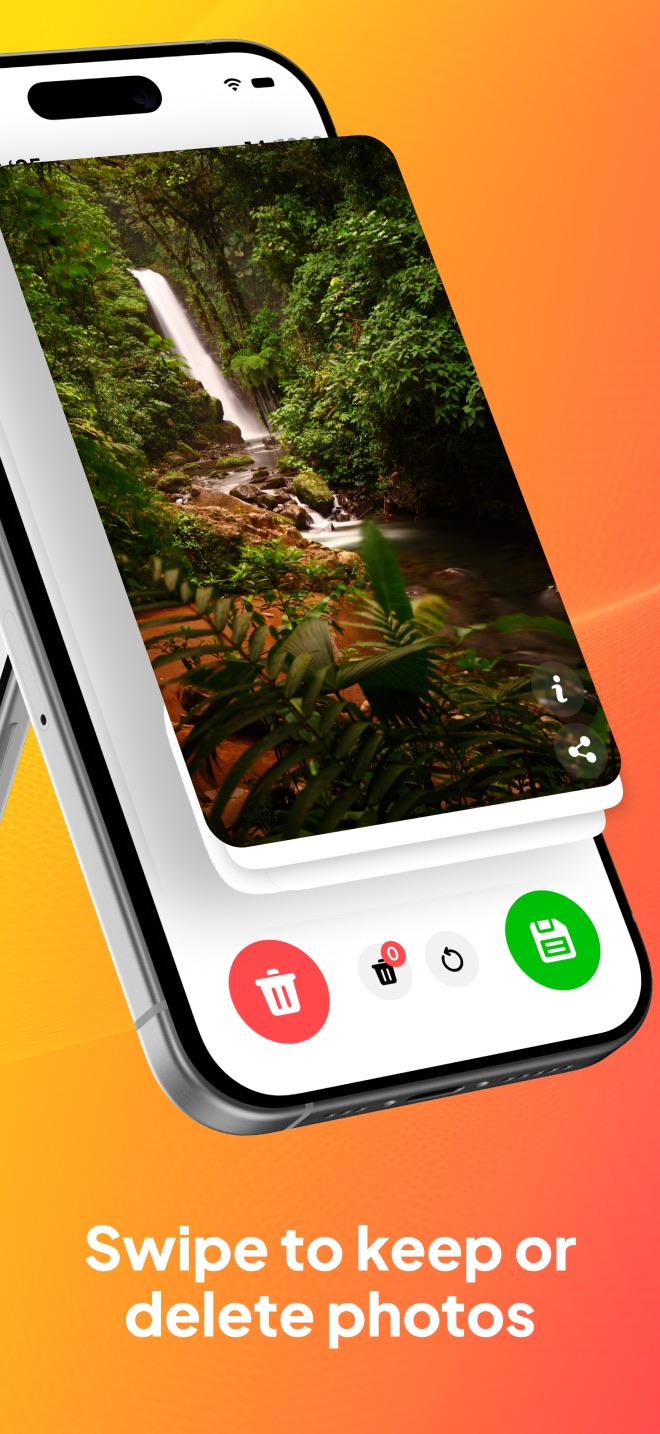
The two differences that tend to matter to people leaving a paid cleaner:
- The cleaning is free. Swiping, the PhotoBin, and the monthly organization all work without paying. There's an optional premium subscription that adds conveniences — reaching the PhotoBin at any time rather than after finishing a month — but the core job of clearing out your camera roll doesn't cost anything.
- It's 100% on-device. Photos are never uploaded to a server. It runs in airplane mode, and no account or sign-up is required.
In fairness, one thing is not a difference: on the free tier PicSwipe also asks you to finish reviewing a month before it commits those deletions, which is much the same flow SwipeWipe uses. It's a deliberate guardrail rather than a paywall — it stops a half-finished session from deleting things you hadn't decided on yet.
Cancel the subscription, keep the swiping
Same swipe-to-clean workflow, free to use, and your photos never leave your iPhone. Clean one month tonight and see.

Before you switch: two free things to try first
If your goal is storage rather than tidiness, you may not need any cleaner at all. iOS has a built-in Duplicates album that merges exact copies for free — our duplicate photos guide shows where to find it. And emptying Recently Deleted is the single fastest way to reclaim space, because photos you "deleted" weeks ago are still taking up room until you do; that one is covered in the free up iPhone storage guide. Do both, then decide whether a swipe cleaner is still worth installing.
Frequently asked questions
Is SwipeWipe safe to use?
SwipeWipe is a legitimate App Store app that has passed Apple's review, and at the time of writing it holds a 4.7 average from roughly 85,000 ratings. Any iOS photo cleaner deletes through iOS's own confirmation dialog, and deleted photos still land in Recently Deleted for 30 days, so a mis-swipe is recoverable. Most complaints you'll find in search are about billing and cancelling the subscription rather than lost photos. Before trusting any cleaner with your camera roll, read its privacy policy to see whether photos are processed on your device or uploaded to a server.
How do I cancel my SwipeWipe subscription?
Cancel it through Apple, not inside the app. Open Settings, tap your name at the top, tap Subscriptions, select the SwipeWipe entry, then tap Cancel Subscription. You can also do it from the App Store: tap your profile picture, then Subscriptions. Deleting the app does not cancel the subscription, and your access continues until the end of the period you already paid for.
Is there a free alternative to SwipeWipe?
Yes. PicSwipe uses the same swipe-left-to-delete, swipe-right-to-keep mechanic and is free to download, with the swiping, the PhotoBin safety net, and month-by-month organization all usable without paying. It also processes everything on-device, so your photos are never uploaded and it works in airplane mode.